/
TouchCast Studio: How To Add Transitions Between Clips
TouchCast Studio: How To Add Transitions Between Clips
- Leena Abraham (Deactivated)
- Jira Automation (Deactivated)
Owned by Leena Abraham (Deactivated)
Last updated: Oct 19, 2017 by Jira Automation (Deactivated)
1. In the TouchCast Editor, locate the two clips that you'd like to add a transition between

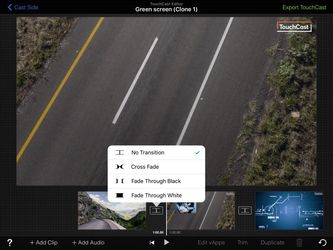
2. Tap the transition icon in between the two clips. You will see a pull down menu appear. Tap to choose the desired type of transition: Cross Fade, Fade Through Black, Fade Through White.
.
3. Once you've added a transition, the transition icon between the clips will change reflecting your chosen transition.
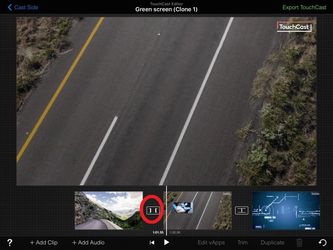
, multiple selections available,
Related content
TouchCast Studio: How to Duplicate a clip
TouchCast Studio: How to Duplicate a clip
More like this
TouchCast Studio: How To Cut A Clip
TouchCast Studio: How To Cut A Clip
More like this
TouchCast Studio: How To Re-Arrange Clip Order
TouchCast Studio: How To Re-Arrange Clip Order
More like this
TouchCast Studio: Adding a touchcast inside touchcast
TouchCast Studio: Adding a touchcast inside touchcast
More like this
TouchCast Studio: How Do I Merge TouchCasts?
TouchCast Studio: How Do I Merge TouchCasts?
More like this
TouchCast Studio: vApp Animation
TouchCast Studio: vApp Animation
More like this